Access advanced geospatial capabilities in Snowflake CoWork



For many teams, every piece of spatial analysis still requires the data to be processed and moved to a specialized database or mapping server. The moment it leaves Snowflake it stops being the organization’s governed version of that data: the row access policies stay behind, the masking stays behind, the lineage stays behind, and the extract starts going stale the same afternoon. The cost is never only the analyst’s time. It is that the answer comes from a copy nobody can vouch for.
Cloud-native and Agentic GIS platforms such as CARTO make a different arrangement possible, where the question travels to the data instead. CARTO for Agents opened the platform up to agents, and the CARTO MCP Server (Model Context Protocol) made every part of it callable from any MCP-compatible client: maps, workflows, apps, geocodes, routes, and access to third-party data. Analysts and GIS practitioners stop being the bottleneck for routine requests and return their attention to the harder questions, and the people asking the questions stop waiting.
For Snowflake customers the fit is strong. CARTO already runs natively on Snowflake, so the SQL an agent triggers executes in your own warehouse against the governed table. Snowflake CoWork is where your teams meet agents in chat. Put the two together and spatial analysis becomes something anyone in the account can ask for, with nothing extracted and nothing copied.
Turning Snowflake CoWork into a geospatial agent with the CARTO MCP Server
Register CARTO as an external MCP server connector and CoWork can carry out geospatial work for you: building maps, revising them, rebuilding them for another region, designing analysis, running it, and looking after your CARTO account. The security model is the one you already run. Each user completes their own consent, so calls arrive in CARTO as if made by that person, execute in Snowflake as that person, and respect the roles, row access policies, and masking already attached to them.
Say what you want, then refine it. The first map comes back from a sentence. After that you adjust in words: a different variable, a coarser classification, one layer removed, a legend that reads at a glance. Analysis works the same way. Talk the method through with the agent, then have it build a CARTO Workflow, which leaves you a pipeline that can be opened, reviewed, forked, and scheduled, running identically every time rather than depending on SQL improvised at the moment of asking.
The long, dull jobs become routine. A map per region across every region you operate in. The whole set refreshed when new data lands. One scoring model rerun with a different weighting per business unit. None of it was ever difficult, just long, and that is why it kept getting deferred. The agent gives the last item the same attention as the first.
Spatial analysis reaches further into the company. Somebody who has never opened a mapping tool can ask a spatial question and act on the answer. A supply planner asks which depots overlap. A portfolio manager runs the exposure workflow and asks what moved since the last run. They authorize CARTO once from CoWork, and after that the analysis comes to them.
Administration, available in the same window. The CARTO interface remains where platform work lives. What changes is that the same operations are exposed as tools, so an administrator can ask the agent to review connections, add people, rotate credentials, or summarize what has been built and by whom.
Governed and secure by design. Nothing is copied out. CARTO is cloud-native, so every query runs inside Snowflake on the governed table. The MCP tools call the same CARTO APIs that sit behind any of the other platform tools, carrying the signed-in user’s token, which means existing permissions and row-level controls apply with nothing new to configure. Activity Data records each action next to the platform that made it, and your choice of model stays yours.
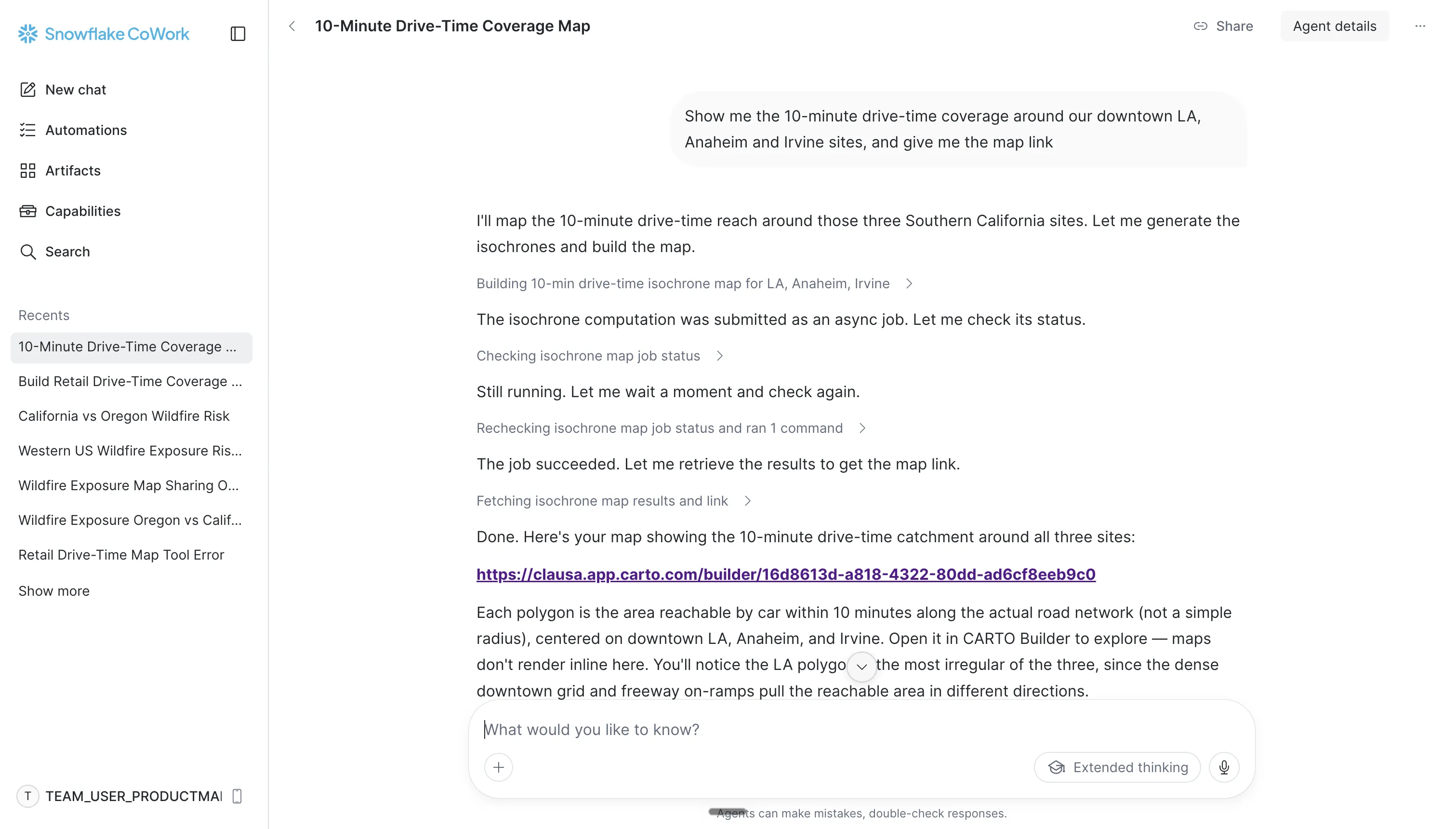
Connect the CARTO MCP Server to Snowflake CoWork
Setup happens in the Snowflake UI. You will need ACCOUNTADMIN on the account and a confidential SPA OAuth client in CARTO with a client secret. To configure the CARTO MCP Server follow these steps:
In CARTO, go to Developers > Credentials > SPA OAuth Clients and create a confidential client. Keep the Client ID and Secret to hand, along with the MCP Server URL from your Workspace.
In Snowflake, go to Settings > MCP connectors > Add MCP Connector. Give it a location, name and description, choose Standard OAuth as the API integration, then fill in the server URL, CARTO’s authorization and token endpoints, your client credentials and the scopes listed in the docs.
Grant the agent’s role access to the connector, then open Agents, pick your agent, and under Configuration > MCP choose Add to agent and select the CARTO connector. Run the consent flow once to sign in to CARTO.
While you are in the agent’s configuration, open Skills > Add skill and add the CARTO Agent Skills you want, one at a time, starting with the ones that match the work your teams do.
Save and publish the agent, then use the menu next to its name to choose Add to Snowflake CoWork. In CoWork, under Capabilities > MCP Connectors, select Connect on the CARTO connector, start a new chat and pick the agent.
One note worth knowing: access is granted per user, so each person completes their own CARTO consent and inherits their own permissions.
Before you call the setup finished, launch the agent and ask it which CARTO tools it has. That is where credential and grant problems surface, and it takes a few seconds to check.
Full instructions, including a SQL-based configuration alternative, are available in our documentation.
See it in action
Using Snowflake CoWork to analyze retail store performance
In this example, we asked CoWork to build a CARTO Builder map of retail performance straight from a Snowflake table, ranking stores on revenue per m².
The agent checked the column distributions before choosing its breaks rather than defaulting to quantiles, and excluded stores with missing or zero floor area so a divide-by-zero couldn’t invent a bottom performer. Points are colored by revenue per m² and sized by total revenue, over a faint population layer for demand context.
It finished with a cross-filtering dashboard — average revenue/m² as a KPI, a breakdown by state, and a store-format filter — so the regional team can interrogate the estate themselves instead of asking for a new cut.
Using Snowflake CoWork to publish a geospatial analysis workflow as a reusable tool
In this other example, we asked CoWork to build a CARTO Workflow over the retail store performance data on Snowflake: filter stores by state and type, calculate drive-time isochrones around them, render the result as a Builder map, and then publish that workflow as an MCP tool called retail_drivetime_map.
The parameters are the point: state, store type, and drive time. Once published, the analysis stops being a pipeline someone has to open and becomes a tool anyone in Snowflake CoWork can call in plain language — “show me 15-minute coverage for supermarkets in California” — with the logic fixed and reviewed, and only the inputs changing.
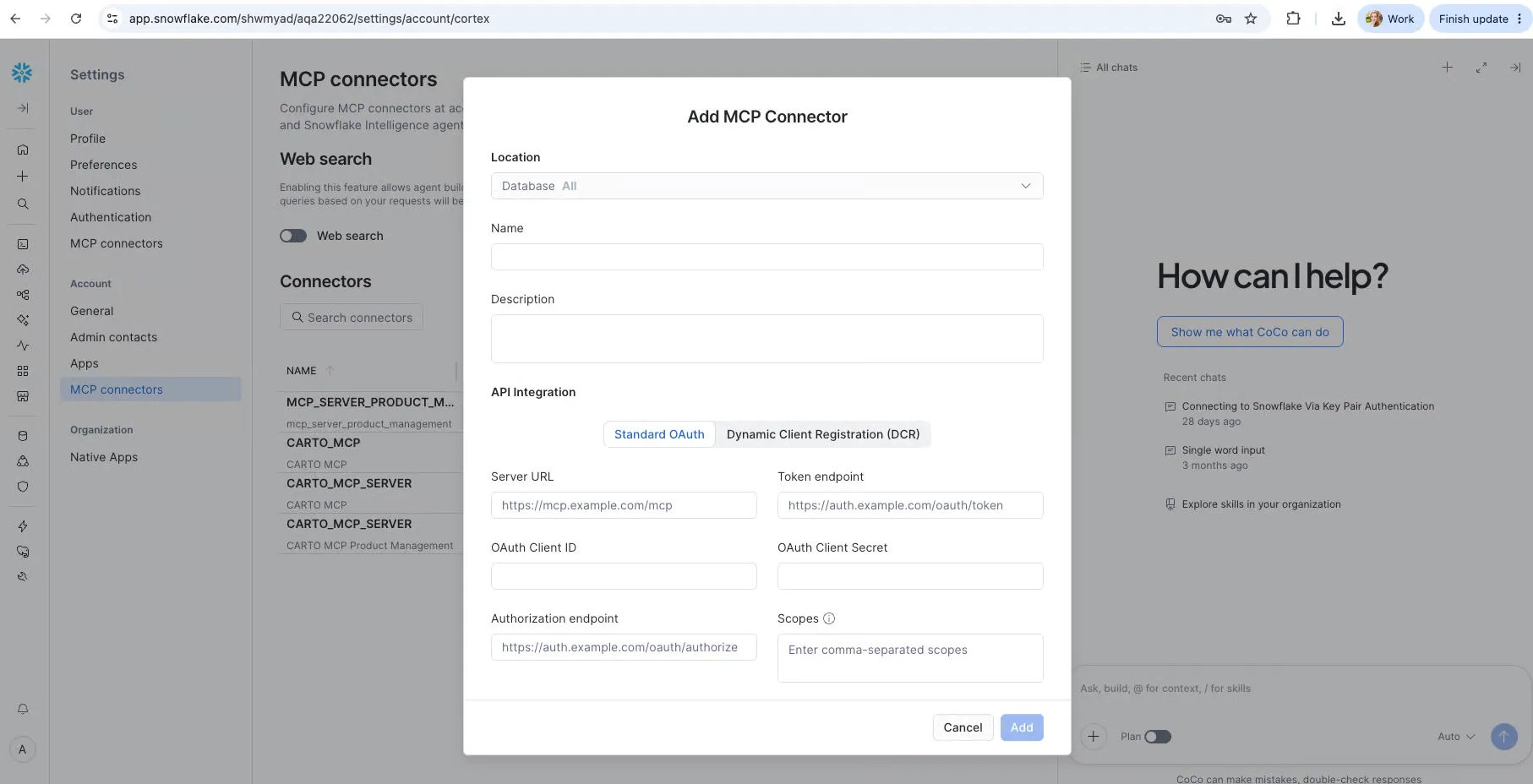
Drive-time analysis from Snowflake CoWork is just one MCP tool away
With just prompting “Show me the 10-minute drive-time area around our downtown LA, Anaheim, and Irvine sites, and give me a link to the map;” Snowflake CoWork calls the Location Data Services tool on the CARTO MCP Server, which in turn invokes the Analytics Toolbox procedure installed in the user’s own Snowflake database. CoWork then takes the result and builds a new CARTO Builder map from it.
CARTO CLI: ship spatial apps and analysis workflows with Snowflake CoCo
Snowflake positions CoCo as the coding agent for building on governed data: automating recurring workflows, developing and deploying apps, and operationalizing AI on enterprise data from a prompt. It runs in Snowsight, as a desktop app, and as a CLI in your local shell, and it is aimed at analysts as much as at engineers. Two pieces of spatial work sit squarely in that mode: vibe coding and shipping a spatial app, and iterating on a complex analytical pipeline until the method holds up.
The CARTO CLI is built for that mode of working. It runs in the same shell CoCo does, it covers the scripted, bulk, and administrative work a chat surface should not carry, from SQL queries to authoring and validating workflows to managing credentials and auditing usage, and it returns output an agent can pipe into the next step, diff, and commit. Install it with npm install -g @carto/carto-cli and the docs cover the rest. The MCP Server is available in CoCo as well, and the CARTO Agent Skills teach the agent how CARTO work is done and which of the two to reach for.
From there, CoCo can build and ship a spatial app on your Snowflake data, scoping its credentials to only what the app needs, or work through a serious analysis such as site selection or distribution center placement: exploring the warehouse, validating the design against it, and leaving behind a versioned CARTO workflow that anyone can rerun.
Start today!
If you are a CARTO customer, you are a couple of minutes away. Register the CARTO MCP Server in your Snowflake account, add its tools to an agent, publish it to CoWork, and ask for your first map. Pair it with the Agent Skills so the agent brings geospatial judgment as well as access.
Not sure where to start, or not a customer yet? Request a demo and we will show you what your own Snowflake data looks like from inside CoWork.
Frequently Asked Questions
What is the CARTO MCP Server for Snowflake CoWork?
It’s an external MCP connector that lets Snowflake CoWork agents call CARTO’s platform — building and revising CARTO Builder maps, running spatial analysis, and publishing CARTO Workflows — with the underlying SQL executing directly in your own Snowflake warehouse against the governed table, rather than a copied extract.
Does connecting CARTO to Snowflake CoWork move or copy my data?
No. CARTO is cloud-native, so every query the agent triggers runs inside Snowflake on the governed table. Each user completes their own CARTO consent, so calls execute as that person and respect their existing roles, row access policies, and masking.
What do I need to set up the CARTO MCP Server in Snowflake?
You need ACCOUNTADMIN access on the Snowflake account and a confidential SPA OAuth client created in CARTO under Developers > Credentials > SPA OAuth Clients, along with the MCP Server URL from your CARTO Workspace. From there you add the connector in Snowflake’s Settings > MCP connectors, grant the agent’s role access, and complete a one-time consent flow.
How is the CARTO CLI different from the CARTO MCP Server in Snowflake CoCo?
The MCP Server is built for chat-driven requests inside CoWork, while the CARTO CLI handles the scripted, bulk, and administrative work — SQL queries, authoring and validating workflows, managing credentials, auditing usage — that a chat surface isn’t suited for. Both are available in Snowflake CoCo, and the CARTO Agent Skills teach the agent which one to reach for.