Location Intelligence vs Business Intelligence: a guide for enterprise data teams



Your BI dashboard tells you that revenue in one region dropped last quarter. It does not tell you that a competitor opened three stores inside your best catchment area, that two of your branches now overlap, or which empty site would recover the lost demand. Those are spatial questions, and they are where Business Intelligence reaches its limit.
This is the practical difference between Location Intelligence vs Business Intelligence. BI answers what happened. Location Intelligence answers where it happened and why location changes the answer. This guide covers what each one does, where BI stops, and why the cleanest way to add spatial analysis is to run it on the data you already have.
What is Business Intelligence?
Business Intelligence is the practice of analyzing structured business data to report on performance. It pulls from sources like sales systems, finance, inventory, and CRM, then turns the result into dashboards, KPIs, and reports. Tools such as Tableau, Power BI, and Qlik are built for this work.
BI is very good at one thing: telling you what happened and what is happening now, across the metrics a business already tracks. When location appears at all, it is usually a map pinned into a dashboard for display, not for analysis.
What is Location Intelligence?
Location Intelligence is the practice of answering spatial questions with location data. It works with points, boundaries, movement, demographics, and networks, and it runs real spatial analysis on them: measuring proximity, building catchment areas, calculating routes, and finding statistically significant patterns.
The shift is from showing data on a map to analyzing the map itself. Instead of plotting stores as dots, Location Intelligence asks which areas are underserved, how trade areas overlap, and where the next location should go. Geography stops being decoration and becomes part of the math.
Location Intelligence vs Business Intelligence: a side-by-side comparison
The two disciplines overlap in their goal, better decisions from data, but differ in what data they use and what questions they can answer.
| Business Intelligence | Location Intelligence | |
|---|---|---|
| Data focus | Structured business data: sales, finance, inventory, CRM. Maps appear occasionally, for display. | Location-first data: points, boundaries, movement, demographics, and networks. |
| Core question | What happened, and what is happening now? | Where is it happening, and why does location change the answer? |
| Analysis | Visualizes and reports pre-aggregated results, sometimes on a map. | Runs spatial analysis: proximity, catchments, routing, and spatial statistics, at scale. |
| Typical user actions | Filtering, slicing, and drilling into dashboards. | Analyzing, comparing, enriching, and putting spatial models into production. |
| Where it runs | Inside the BI tool, reading from the data warehouse. | With a warehouse-native platform, inside the same data warehouse, as SQL, with no separate copy. |
Where BI stops and Location Intelligence begins
The gap shows up the moment a decision depends on distance or geography. A BI tool can rank stores by revenue. It cannot tell you that the bottom three all sit more than a 15 minute drive from the population they were meant to serve.
A few questions that fall outside what BI handles well:
- Site selection. Where should the next store, branch, or warehouse go, given existing locations, competitors, drive times, and local demand?
- Catchment and cannibalization. Which areas does each location actually serve, and where do two locations compete for the same customers?
- Territory design. How do you split a region into balanced, contiguous territories instead of dividing a spreadsheet by row count?
- Risk concentration. How much exposure sits inside a flood zone, a wildfire perimeter, or a single postal code?
- Network and logistics. What is reachable within a service window, and how should routes adapt to it?
A BI chart can describe the outcome of these decisions after the fact. It cannot model the geography that produces them. The popular tools make this concrete: Tableau and Power BI can plot points on a map, but they were not built to analyze them. That is the work spatial analysis is built for.
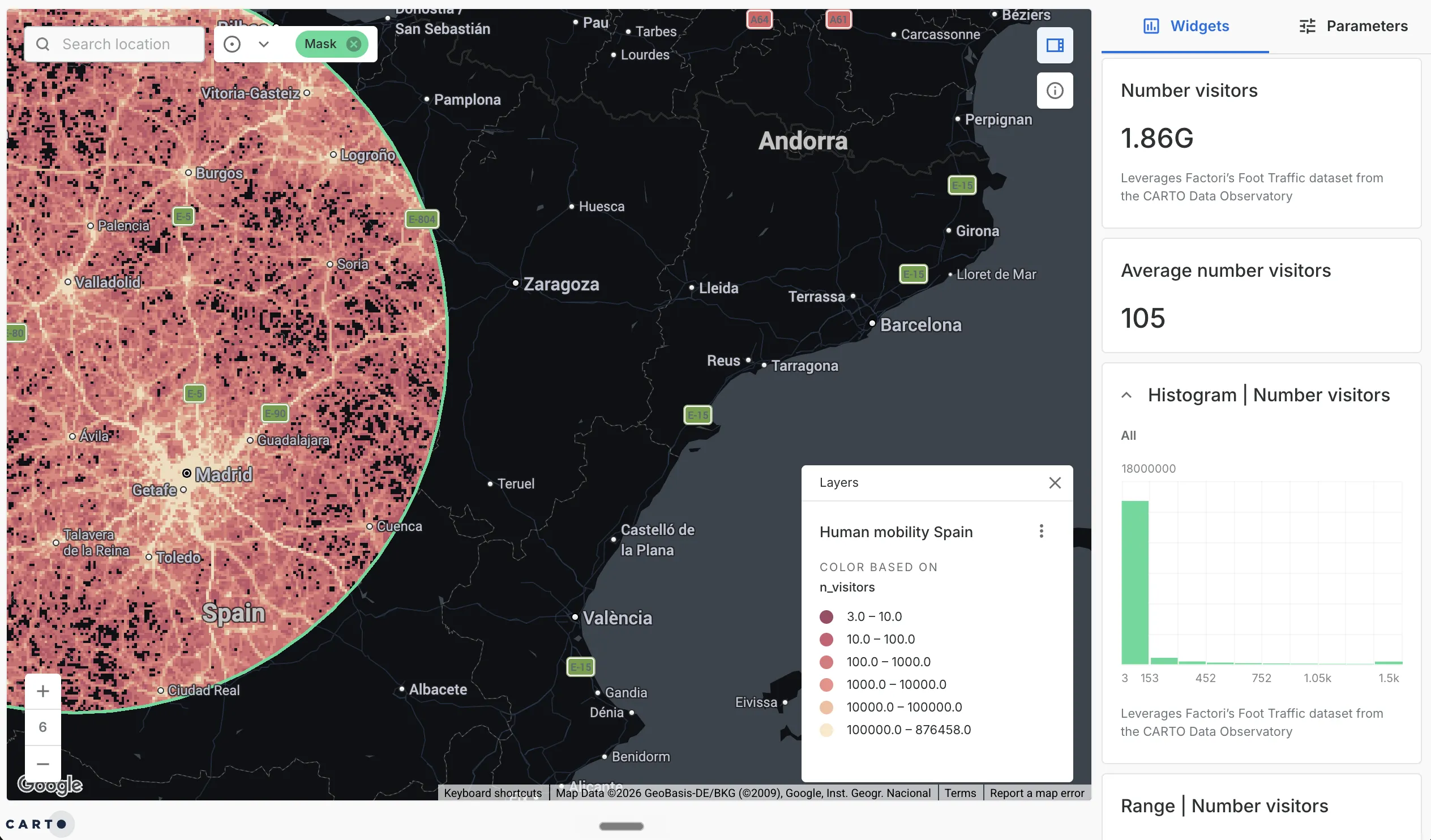
A catchment question BI can’t answer: foot-traffic volume inside a defined service area around Madrid, built on mobility data from the CARTO Data Observatory.
Why warehouse-native Location Intelligence changes the equation
Historically, adding Location Intelligence meant standing up a separate GIS: its own servers, its own file formats, and a pipeline to copy data out of the warehouse and into the GIS. That parallel stack is the reason many teams treat spatial as a specialist island instead of part of their analytics.
A cloud-native platform removes the island. CARTO runs spatial analysis directly inside Snowflake, BigQuery, Databricks, Redshift, and Oracle, as SQL, on the same tables that already feed your BI tools. Three things follow from that:
- One copy of the data. Spatial analysis reads the governed warehouse tables your BI already uses. No export, no sync pipeline, no second version of the truth.
- Analysis at warehouse scale. Proximity, catchments, and spatial statistics run on millions of records using the compute you already pay for, rather than on a workstation that runs out of memory.
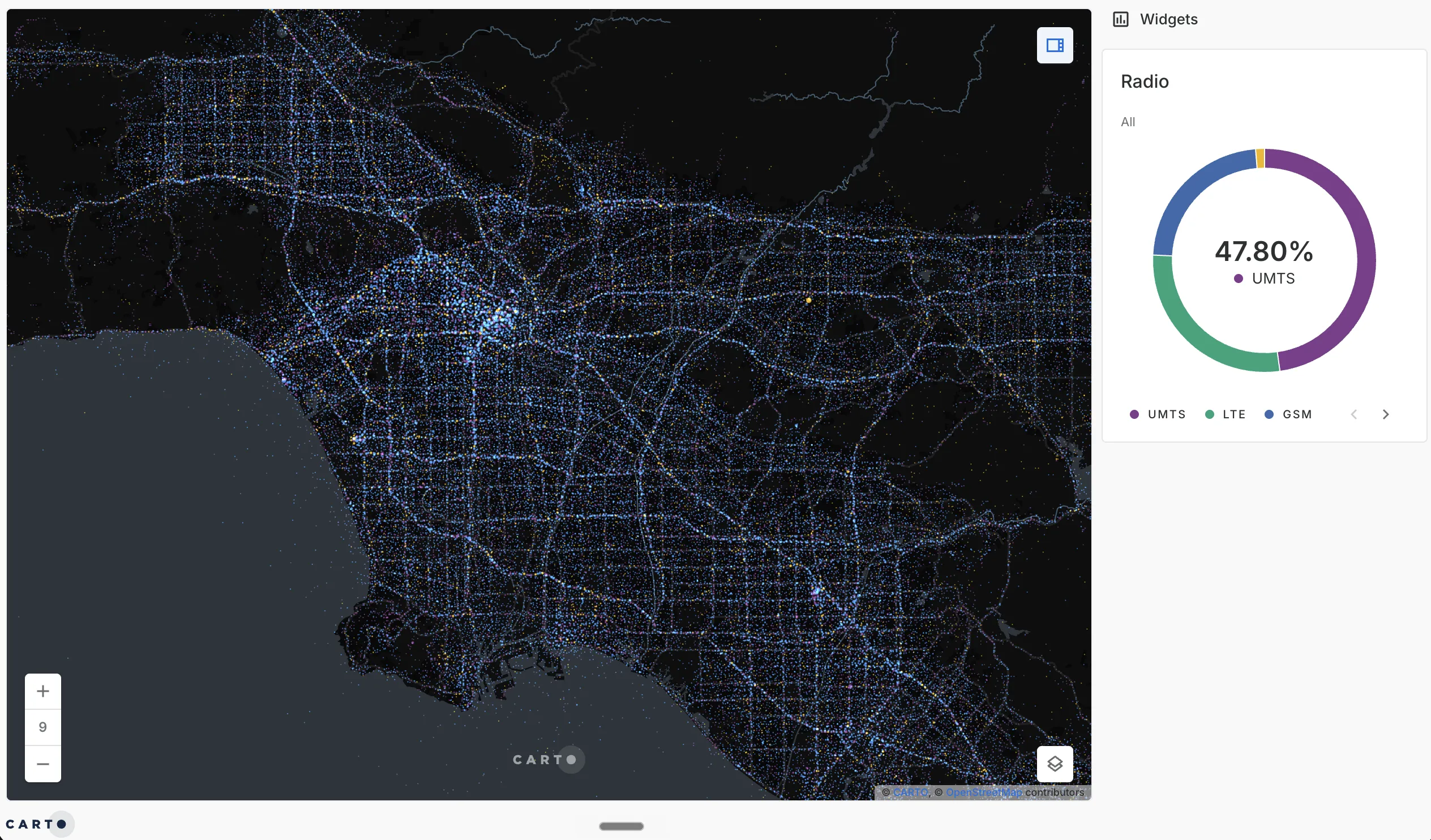
Analysis at warehouse scale: millions of individual telecom signal points across Los Angeles, the kind of volume that overwhelms a desktop GIS but runs natively in the data warehouse.
- The whole team can do it. Because the work is SQL, data analysts and data scientists can run spatial analysis without learning a proprietary GIS language. With AI Agents for spatial analysis, they can ask in plain language and get the analysis back against governed warehouse data.
In that model, Location Intelligence is not a second platform bolted onto BI. It is the same data, analyzed with the spatial dimension added back in.
When to choose Location Intelligence, and when BI is enough
Use the question, not the tool, to decide. If the answer comes from a metric you already track over time, BI is the right home for it: revenue trends, conversion rates, inventory turns, financial reporting.
Reach for Location Intelligence when the answer depends on where things are in relation to each other: choosing locations, drawing territories, measuring catchments, concentrating or spreading risk, or planning a network. In practice most enterprise teams need both, which is the real argument for running them on shared data. When spatial analysis lives in the same warehouse as the rest of your analytics, moving between a BI question and a spatial one stops being a hand-off between two systems. You can even bring the spatial output back into Power BI or Tableau, so the map sits next to the dashboards your teams already use.
Add the spatial dimension to your analytics
If your BI stack already reads from a cloud data warehouse, you are most of the way to Location Intelligence. The data is in place. What is missing is the spatial analysis layer, and the question is whether you add it as a separate GIS or run it on the data you already have.
To see what spatial analysis looks like running inside your own warehouse, request a demo.
Frequently Asked Questions
What is the difference between Location Intelligence and Business Intelligence?
Business Intelligence analyzes structured business data, such as sales, finance, and inventory, to report what happened and what is happening now. Location Intelligence adds the spatial dimension: it analyzes where things happen and why location changes the outcome, using techniques like proximity, catchment areas, routing, and spatial statistics. BI tells you that a store underperformed; Location Intelligence tells you it sits outside its catchment and which site would have captured the demand.
Is Location Intelligence a replacement for Business Intelligence?
No. The two work together. BI remains the right tool for financial reporting, KPIs, and dashboards built on structured data. Location Intelligence handles the questions BI struggles with, the ones where distance, geography, and spatial relationships decide the answer. The most useful setup runs both on the same data rather than treating spatial as a separate system.
What are the benefits of Location Intelligence over standard BI for data teams?
For data teams, the gains are concrete: spatial questions get answered with real analysis instead of a static map pasted into a dashboard, the work runs at the scale of millions of records, and the analysis lives in SQL the whole team already knows. When Location Intelligence runs inside the data warehouse, there is no separate GIS stack to maintain and no copied data to keep in sync.
Can Location Intelligence improve decision-making compared to BI platforms?
Yes, for decisions where location is a factor. Site selection, territory design, network planning, risk concentration, and logistics all depend on spatial relationships that a standard BI chart flattens or hides. Location Intelligence keeps geography in the analysis, so the decision accounts for proximity, accessibility, and spatial patterns rather than averaging them away.
Do I need a separate platform to add Location Intelligence to my BI stack?
Not necessarily. Legacy GIS expects its own servers, formats, and data copies, which creates a parallel stack. A warehouse-native platform like CARTO runs spatial analysis directly inside Snowflake, BigQuery, Databricks, Redshift, or Oracle, so Location Intelligence works on the same governed data that already feeds your BI tools, with no separate silo to build or maintain.