Introducing Voyager: The New CARTO Basemap


Using Voyager in your own application? CARTO basemaps now require a free API key. Request yours at carto.com/basemaps/apikey. It is free up to 5 million tile requests a month and needs no CARTO account. Then add the key to your tile URL:
https://basemaps.cartocdn.com/rastertiles/voyager/{z}/{x}/{y}.png?key=YOUR_KEYSeeing an "API key required" watermark on your map? That is why. Maps built inside CARTO Builder or Workflows are unaffected. Below is the original launch announcement.
The basemap is the unsung hero of cartography.
Regardless of the intended purpose scale or theme the basemap must always provide the proper context use a clear visual language and effectively communicate the underlying data.
For that reason we're constantly working to improve our basemaps and have decided to release a new version: Voyager.
Designed by our talented Head of Cartography Mamata Akella this mobile-optimized basemap comes in three flavors (labels on top labels under and no labels). In addition this iteration makes it even easier to incorporate vital street-level data better understand the potential flow of traffic within an area and create stunning intelligible maps.
Door to Door Service: Building Addresses Now Available
At the largest zoom individual building addresses now appear directly on the map allowing users to operate at the level of the street.
For example a real estate firm can now use Voyager to track and manage its properties. Or city planners can visualize and more quickly respond to all of the residencies and businesses that have made 311 calls reported crimes in their area or need to have their driveways ploughed for snow.
A financial firm can even create a map that easily visualizes its highest value properties and identify where additional investments and opportunities are located without additional building data.
Main Boulevard not Main Street: Visualizing the Roadways
Because so many of our users rely on CARTO to show how people move within an area we wanted to emphasize the arteries of any place: the streets.
Under Positron every avenue highway and back-woods road was depicted using the same white color.
In Voyager we've used different colors to show a clear hierarchy of highways major roads and minor roads. We've also labeled each one which is more than just an aesthetic improvement.
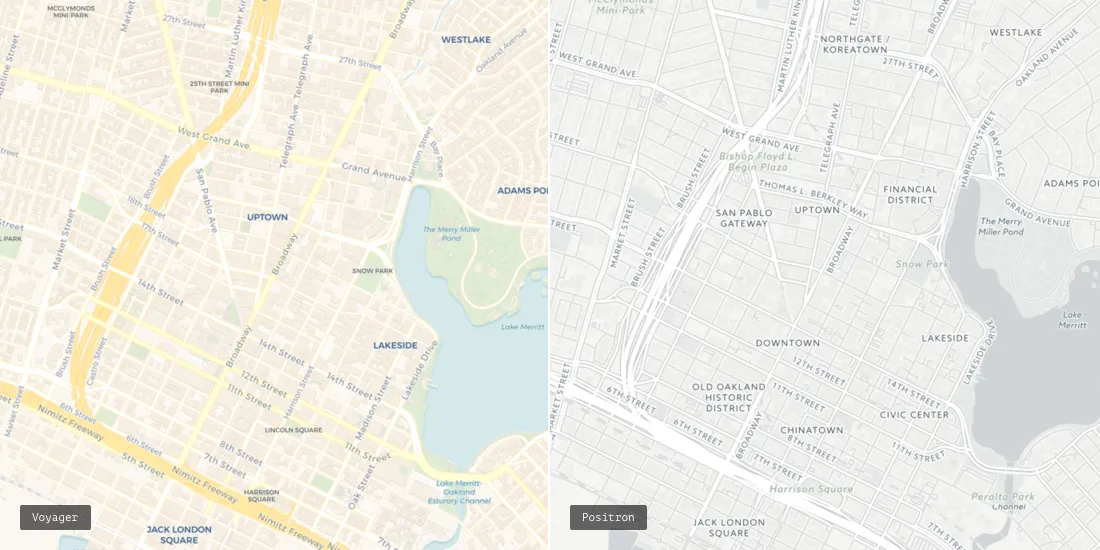
Under this new system users can identify specific road segments and intersections giving their maps yet another level of complexity.
For example after a natural disaster first responders can identify streets that have been damaged and assign service providers accordingly. While the crews work on repairs officials can devise the safest and most efficient detours allowing the entire system to recover as quickly as possible.
And just like Positron and Dark Matter all information about roads buildings and points of interest is regularly updated and maintained for accuracy.
Tiny Tweaks: A Host of New Design Features
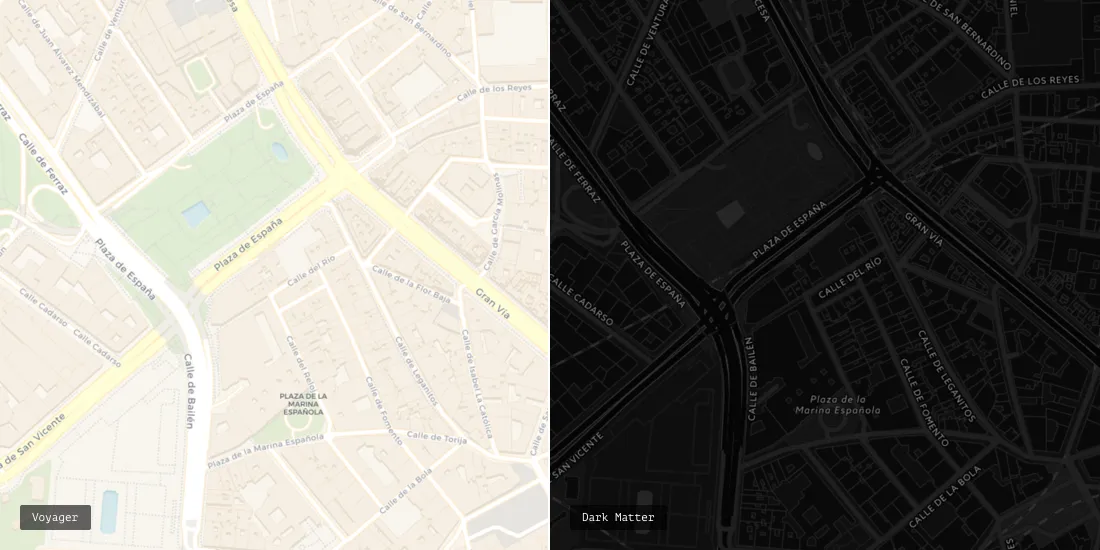
We've also made several subtle design changes in order to ensure that your maps are as clear as possible.
City icons are now squares instead of circles to eliminate any confusion. Bodies of water now have drop shadows to further emphasize important boundaries.
Labels are no longer written in all caps for greater legibility and we've limited their size to remove unnecessary clutter. And as a user zooms further more labels appear which allows maps to contain rich details without becoming overcrowded.
If you need a few weeks to adjust to this new basemap no need to worry. All of your existing maps will remain as they are. However anything new that you build will be on Voyager except for Legacy Editor maps which will still use Positron. And if the only change you can handle at the moment is the transition from summer to fall you're in luck. Positron and Dark Matter will still be available in the basemap selector.
Frequently Asked Questions
Do I need an API key to use the CARTO Voyager basemap?
Yes. CARTO basemaps now require a free API key when used outside the CARTO platform, for example in Leaflet, MapLibre, deck.gl or a BI tool. Request one at carto.com/basemaps/apikey; it is emailed straight back, there is no approval queue and you do not need a CARTO account. Maps built inside CARTO Builder or Workflows are unaffected.
What is the tile URL for the Voyager basemap?
Raster tiles: https://basemaps.cartocdn.com/rastertiles/voyager/{z}/{x}/{y}.png with ?key=YOUR_KEY appended; voyager_nolabels, voyager_labels_under and voyager_only_labels follow the same pattern. Vector style: https://basemaps.cartocdn.com/gl/voyager-gl-style/style.json. Vector is the recommended service: sharper, restyleable in the browser, and where data updates continue.
What is the difference between Voyager, Positron and Dark Matter?
All three are CARTO basemaps built on the same data. Voyager is the general-purpose style with colour-coded roads, labelled streets and building addresses at high zoom. Positron (light) and Dark Matter (dark) are deliberately muted so your data overlay stands out. The same free API key covers all of them.
Why does my map show an 'API key required' watermark?
The tiles are being requested without a key. Request a free key at carto.com/basemaps/apikey, add it to the tile URL as a key parameter, then force-refresh: your browser and the CDN cache tiles, so an old watermarked tile can linger for a moment.