Vibe coding spatial apps with CARTO for Agents


Of all the ways coding agents have reshaped how we engage with technology over the last couple of years, software development and the vibe coding of applications might be some of the most striking ones. Application development looks very different now from what it looked just 6 months ago; coding agents such as Claude Code, Codex, Antigravity, and Copilot keep getting better with every release, and today one developer can ship in a day what used to take a full sprint.
Geospatial application development doesn't have to lag behind that pace. A couple of weeks ago we introduced CARTO for Agents, making CARTO the first GIS platform fully designed for the Agentic Enterprise. Pair a coding agent with the CARTO CLI and our Agent Skills, and that same agent can now scaffold a working CARTO + deck.gl app from a prompt, running locally in seconds.
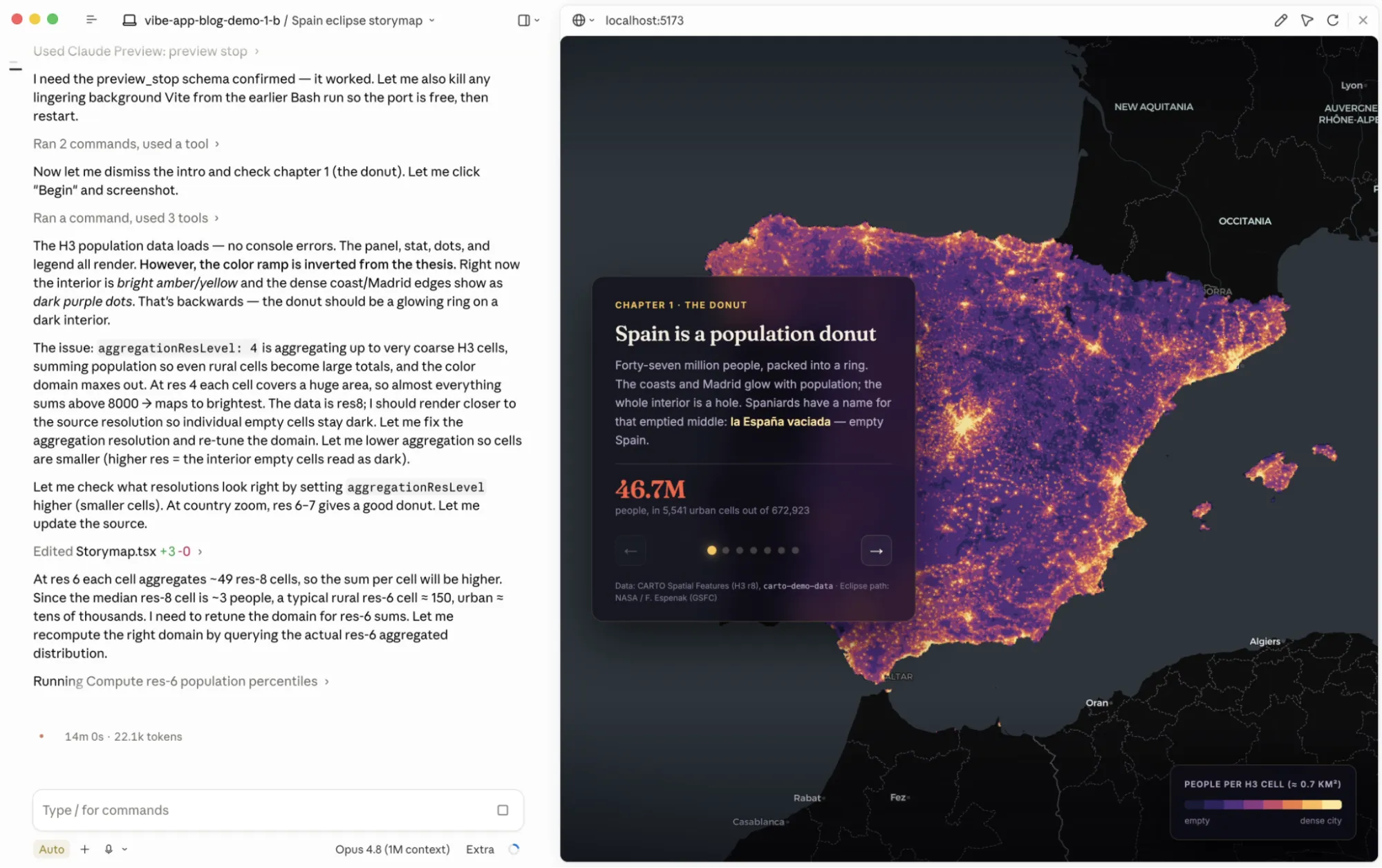
In this blog post we will walk through how AI agents can now generate spatial apps, the composable extensions that turn those apps into story maps or into agentic experiences where users converse with the map, and the CARTO platform elements underneath that keep your data, credentials, and access controls secured and governed.
Vibe coding a CARTO + deck.gl app end-to-end
With CARTO for Agents, the first thing a coding agent does for a spatial app is set up secure, scoped access to your data warehouse. It uses carto credentials create token to mint an API token bound to the specific tables and APIs the app actually needs:
carto credentials create token \
  --connection <conn> --source <table> \
  --apis sql,maps --referers <origins>
For private apps with login, the agent switches to create spa (OAuth Single Page App); for backend or scheduled services, it uses create m2m (Machine-to-Machine). Either way, the data stays in your data warehouse, accessible only through the credentials the agent declared.
With auth resolved, the agent moves on to assembling the application. The carto-develop-app skill doesn't lock you into a stack — it speaks the conventions of the framework you (or your prompt) ask for. TypeScript + Vite is the default for quick exploration, React kicks in by default when you're building production-ready applications, and the same scaffolding patterns can extend to whatever JS framework (Angular, Vue…) your team works in. The result is the scaffold of an app you can npm install && npm run dev and open in the browser, with basemap, layers, widgets, filters, legend, and spatial filtering built with the patterns a GIS developer at CARTO would have used by hand.
Storymaps and agentic experiences: composable variants on the same scaffold
The carto-develop-app skill ships two composable extensions on top of the base scaffold. Both inherit whatever framework, auth, and data-source choices you started from: vanilla, React, or otherwise; only the experience changes.
Story maps layer a scene-and-chapter state machine on top of that scaffold: ordered chapters, fly-through transitions between map states, sticky scrollytelling, narrative overlays. The coding agent recognizes triggers like "story map", "scrollytelling", "guided tour", or "fly through", and applies the storymap pattern to whatever data shape you're working with.
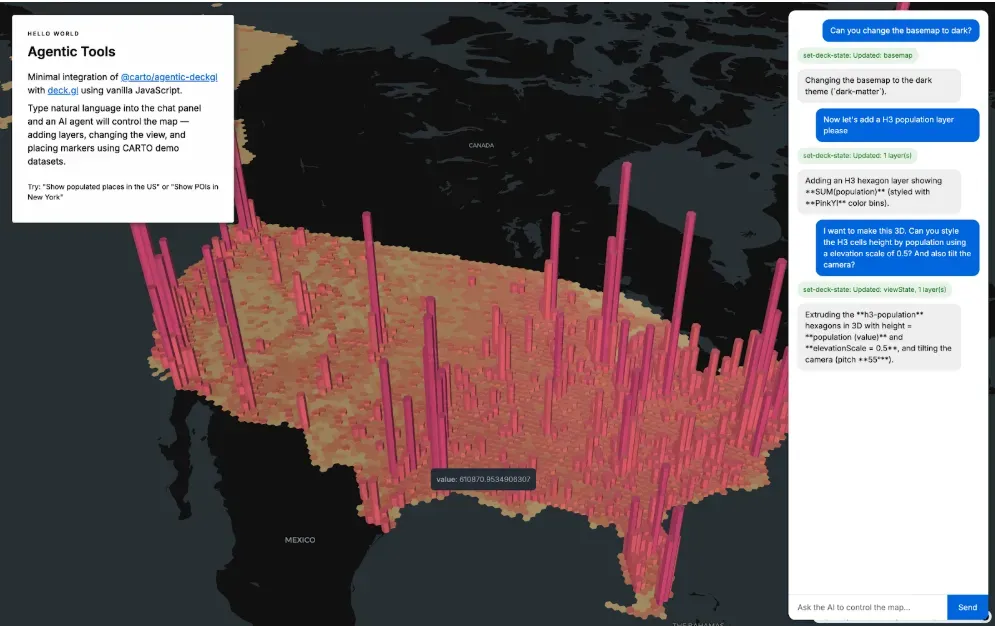
AI-first apps embed an AI Agent inside the application surface itself, so end users can chat with the map and spatial data. Layers, styling, navigation, spatial filtering, even calling CARTO Workflows behind the scenes, can all be driven by natural language. Under the hood, this is powered by CARTO Agentic Tools for developers, our open-source TypeScript library (@carto/agentic-deckgl) that turns any CARTO + deck.gl app into something an AI agent can drive. When you ask the coding agent to "add chat-with-map to this app", the carto-develop-app skill wires @carto/agentic-deckgl in and configures the system prompt so the user's agent arrives in the conversation with CARTO's geospatial expertise already built in.
Fully extensible: your app, your conventions
The scaffold the agent produces is a real CARTO + deck.gl application, not a fixed template, and every layer of it is open for you to extend:
- Get creative with spatial charts and widgets. Widgets created by the agent are backed by CARTO's secure, scalable widget data models: histograms, categories, time series, formulas with cross-filtering wired in by default, so a selection on one widget trims the map and the other widgets in lockstep without you wiring anything up.
- Good design out of the box, completely adaptable to your brand. The scaffold ships with sensible design defaults — palette, typography, spacing, legend, scale — applied with care, and every token is overridable so the result can match your product or brand surface exactly.
- An opinionated cartographer, not just a layer-builder. The carto-develop-app skill knows the CARTO basemap catalog and how to push CARTO + deck.gl to its limits as a cartographic toolkit: choosing the right basemap and projection for your data, styling layers with attention to color, scale, and legibility, and wiring up popups, tooltips, legends, and hover/highlight interactions the way a careful cartographer would.
You don't have to start from scratch. Point the agent at an existing application and ask it to add a CARTO + deck.gl map, spatial widgets, or a story map mode. The agent will seamlessly integrate geospatial components into the surface you already ship.
The agent develops, CARTO makes maps performant
A vibe-coded application is your application, and you deploy it wherever you choose. But the spatial heavy lifting underneath is done by CARTO. Your app uses the @deck.gl/carto module, with the agent picking the right layer and matching source for the data at hand: VectorTileLayer, RasterTileLayer, H3TileLayer, or QuadbinTileLayer. CARTO's Maps API takes over from there: it generates tiles dynamically from SQL queries against your data warehouse, streams them to the browser at the right resolution for the current viewport, and scales to billions of features without anyone copying data into an intermediate mapping service.
That same architecture is what keeps your governance intact. CARTO is cloud-native in the strict sense, which means every query executes inside BigQuery, Snowflake, Redshift, Databricks, or Oracle, respecting row-level security, column masking, and access grants your data team has already configured. The scoped API tokens the agent created bind the app to specific tables, APIs, and origins. For AI-first apps, the same goes for the model layer: @carto/agentic-deckgl is model-agnostic, so the LLM driving chat-with-map is whichever provider your enterprise already trusts.
See two apps we built with Claude Code in action
Let's look at two example prompts that show how the CARTO CLI, the carto-develop-app skill, and your warehouse's credentials work together when a coding agent vibe-codes spatial apps.
Developing a retail performance monitoring dashboard
Every industry and every company has its own culture, terminology, and conventions. A custom app reflects those better than a standard GIS map. Let's use that idea to transform this tutorial from our CARTO Academy into a completely custom retail store performance monitoring dashboard. This is the prompt we used:
"Hey! I'd like to build a very analytical dashboard inspired by this map: https://academy.carto.com/...
It should let me:
* Draw an area of study and analyze performance within it
* Select from different store types using a dropdown
* Filter using different revenue criteria (get creative)"
The agent takes this input and starts breaking down the pieces: from exploring the schema and data sources to building the widgets and filters. Something we love is how the agent uses the carto-develop-app skill to find the deck.gl-community/editable-layers project, which it then uses to build the "draw an area of study" feature. Note how it incorporates both column-based and spatial filters seamlessly!
By assembling these capabilities automatically, the agent dramatically accelerates development and allows teams to move from idea to working spatial application in a fraction of the time.
Developing a scrollable story map about the upcoming solar eclipse in Spain
Story maps are one of the most beautiful ways to weave narrative through data and maps. Let's build one to tell the story of how the upcoming total solar eclipse in Spain (a once-in-a-lifetime event!) overlaps with the country's striking population distribution.
"Hey! I'd like to build a new interactive storymap application about the upcoming total eclipse crossing Spain in summer 2026. I want to tell a story that connects the events with the sociodemographic reality of Spain and how this eclipse crosses some of the empty parts in the north, allowing for unobstructed skies without light pollution. Please use public data sources as needed"
The agent combines the creative freedom of generative AI with the instructions and know-how in CARTO for Agents. Under the hood, it uses the CARTO CLI to import data and generate all the credentials needed to bring this interactive story to life. This format is particularly powerful for stakeholder presentations, executive briefings, and public-facing products, where maps, narrative, and analytics need to work together to communicate a clear and compelling story.
Vibe coding is democratizing access to custom geospatial experiences
For decades, building and shipping a fully custom geospatial application that met real-world requirements for scalability, performance, and user experience was the domain of a small handful of specialized developers. Getting started required significant upfront investment and a long-term commitment that most teams could not justify.
That ceiling is gone. Pair a coding agent with the right primitives and any team can deliver a custom geospatial experience in a day instead of a quarter. Application development is changing quickly and fundamentally across every industry, and CARTO is the layer making that shift possible for geospatial work.
Ready to vibe-code your next spatial app?
Everything in this post is available now to every CARTO user. Install the CARTO CLI, add the CARTO Agent Skills, and let your coding agent of choice drive:
npm install -g @carto/carto-cli
npx skills add CartoDB/agent-skills
Then describe the spatial app you want: a dashboard, a single-page exploration, an embedded analytics surface, a story map, or a map paired with an AI Agent that users converse with — and watch your coding agent assemble it against your CARTO workspace.
Check the CARTO for Agents documentation and CARTO for Developers to learn more, or reach out to us to request a demo.