What's new in CARTO - Q1 2026



AI is reshaping every industry, not just in what products can do, but in how they are built and how people use them. From AI assistants to agentic workflows optimizing entire business processes, the way businesses interact with software is fundamentally changing. Geospatial analytics is no exception. The convergence of AI and spatial reasoning is unlocking a new era where location intelligence is no longer the domain of GIS specialists alone, it becomes accessible to anyone who can ask the right question.
This quarter, we have continued to work on making our Agentic GIS vision a reality, and shipped a significant wave of AI capabilities designed to give our users real productivity and reach gains in their spatial analytics work. We introduced a new AI Assistant for creating and configuring geospatial CARTO AI Agents, added the ability for those Agents to generate interactive charts directly in conversation, and released a developer library with ready-to-use AI tools for building geospatial Agents into custom GIS applications. We also expanded support for new AI providers and LLMs, so teams can leverage the models that best fit their infrastructure and governance requirements. And for those looking to automate the management of their CARTO account and assets through AI, we launched a new CLI purpose-built for that use case.
Beyond AI, we haven't slowed down and continue to build upon the core of what makes CARTO the most advanced cloud-native geospatial analytics platform. Q1 brought meaningful improvements across visualization, data analysis, data governance and access controls, and security — continuing our commitment to give data teams working on Google Cloud, AWS, Snowflake, Oracle, Databricks, and beyond a GIS platform that's both powerful and enterprise-ready.
Here's a look at what's new. And as always, keep an eye on our What's New page for the latest updates.
Agentic GIS
AI Agent's Assistant: Build and iterate through conversation in minutes
Helps you to: Build and deploy a tailored AI Agent in minutes. Describe what you need and let the Assistant handle the rest.
Building an AI Agent just got a whole lot easier. The new Agent Configuration Assistant means you no longer need to manually piece together instructions, select tools, troubleshoot errors and workarounds, and configure settings step by step. Instead, just describe what you want your Agent to do, in your words, and the Assistant builds the full configuration for you.
This AI Assistant is also context-aware. The Assistant understands your specific map, including datasets, layers, and widgets connected so the Agent is grounded in your actual data from the start, not a generic template you have to rework.
And if something isn't quite right? Refine it through conversation, flag errors for quick workarounds, tweak it manually, or do both. You stay in full control throughout.
Go from an idea to a working, tailored CARTO AI Agent in minutes, not hours.
To learn more, visit our documentation.
Build AI-first experiences with Developer Tools: No heavy lifting required
Helps you to: Build flexible AI-first spatial apps that lets an AI Agent create and style map layers, run spatial analytics, and interact with the map all through natural language.
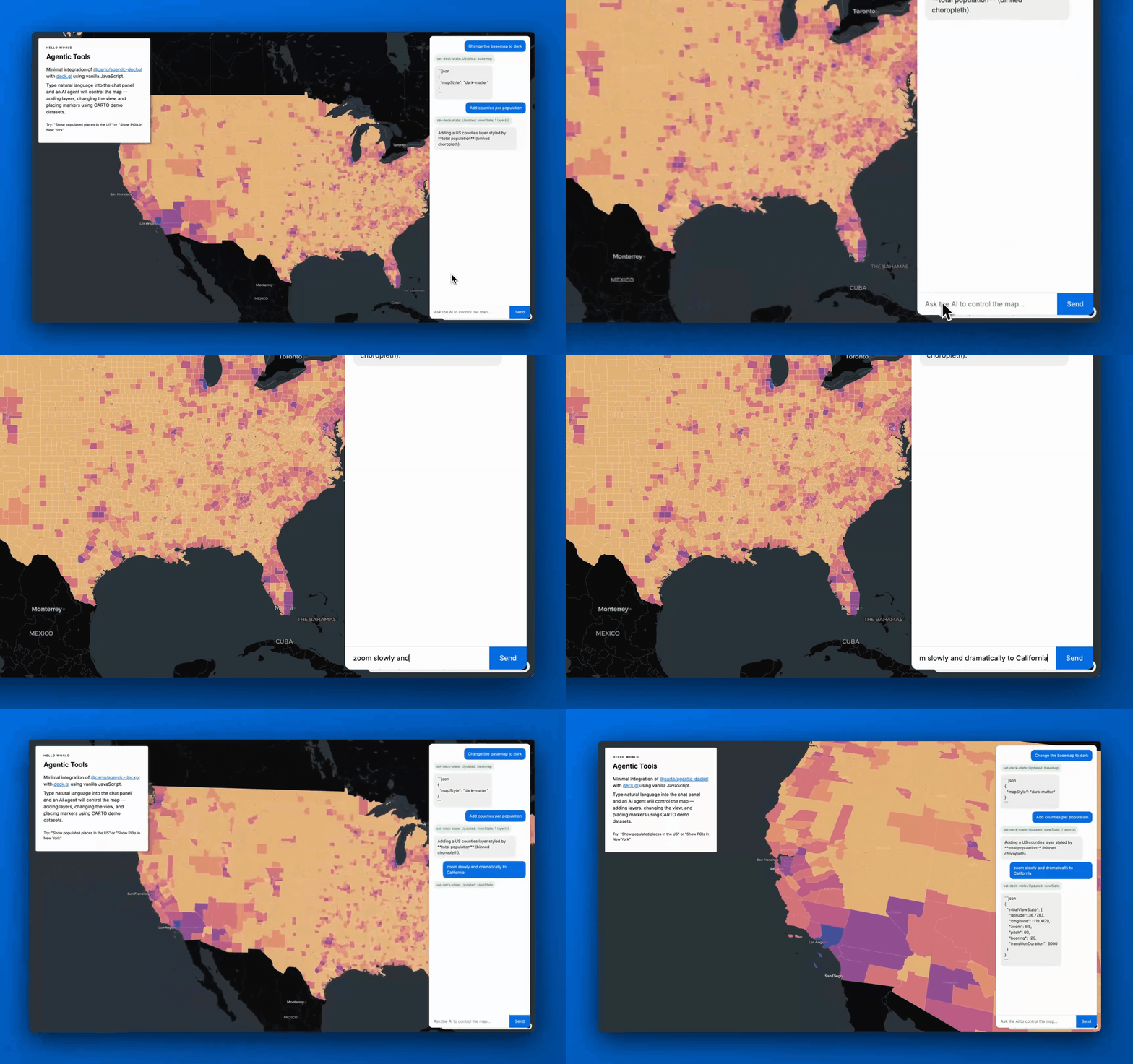
We've made it easier for teams to build interactive and flexible spatial web apps with Agentic Tools for Developers. Our new open-source library gives AI Agents the ability to create and style map layers, run spatial analytics, and respond to natural language questions, all out-of-the-box.
What does that mean in practice? Instead of months of custom development, your team can build a fully interactive conversational map experience where users simply ask questions and the map responds, performing analysis on-the-fly and adding new layers instantly. Ask it to highlight high-risk zones, switch to a satellite view, or filter to a specific region and it just works!
The result: Faster time-to-insight, richer end-user experiences, and less time spent on custom engineering for ad-hoc requests so your team can focus on the analysis and insights that truly matter.
To learn more, check out our product announcement and visit our documentation.
Insights unlocked: On-the-fly charts
Helps you to: Get instant visual answers from your spatial data, right inside your AI Agent conversation.
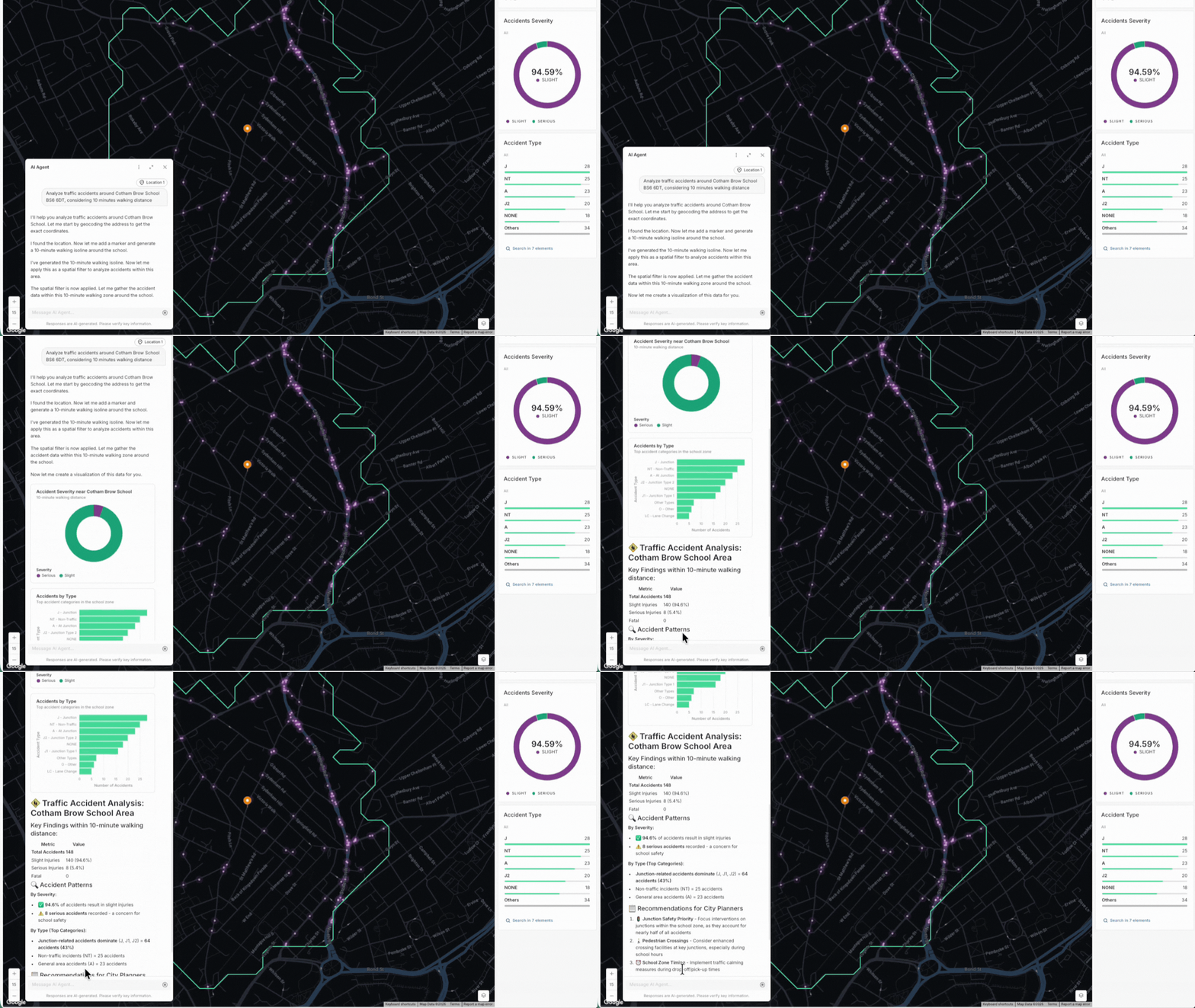
Your AI Agent can now create charts on the fly as part of your conversation. Ask a question and, alongside the map, you'll see bar charts, line charts, or histograms appear right in the chat. No switching tabs.
It's a great way to help your whole team engage with spatial data, without needing to know SQL or GIS. To see this in action, watch AI Agents come to life in this public safety demo showing traffic accidents around schools and recommended public safety interventions. Follow along and build this example in our step-by-step tutorial in the CARTO Academy.
To learn more, watch the full webinar and visit our documentation.
New AI provider and LLM integrations to power your AI Agents
Helps you to: Connect CARTO to the AI models your organization already uses, on your own terms.
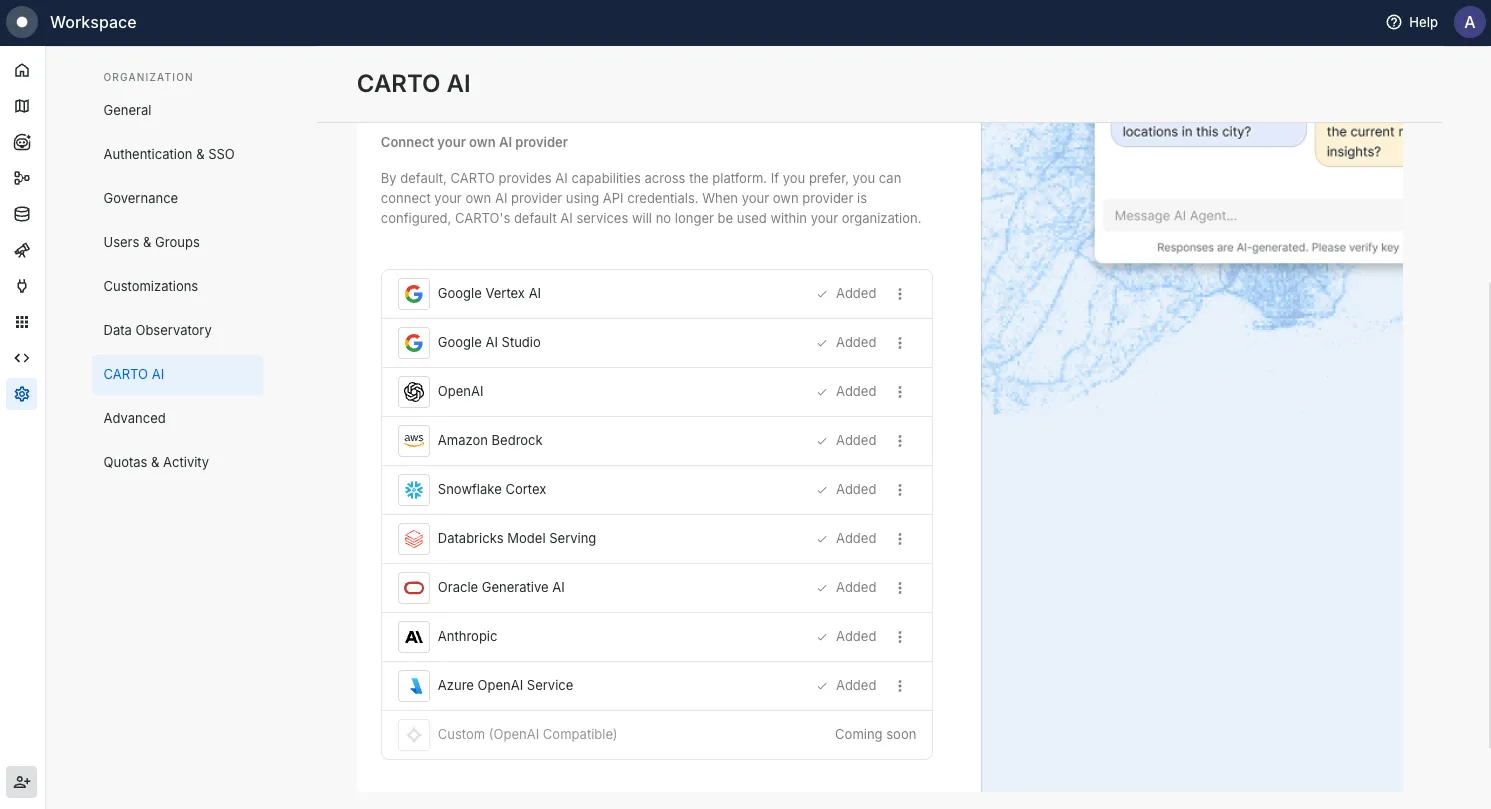
We've made it much easier to bring your own AI models to CARTO. In January, we added seven new providers:
- Google Vertex AI
- Amazon Bedrock
- Snowflake Cortex
- Databricks Model Serving
- Oracle Generative AI
- Anthropic
- Azure OpenAI Service
That means you can run AI Agents on the cloud platform you already use, keep data where it needs to stay, and use existing cloud investments and contracts.
We kept going in February, adding Claude Opus 4.5, Claude Sonnet 4.5, Gemini 3 Pro, and Gemini 3 Flash as ready-to-use options with no extra setup. Then in March, Claude Opus 4.6 and Claude Sonnet 4.6 arrived, bringing noticeably better reasoning and performance for complex spatial tasks.
Not sure where to start? CARTO-managed models are ready to go with zero configuration. Head to Settings > CARTO AI to explore your options, check our documentation for the full list, and visit CARTO Academy for hands-on tutorials.
Data & Analytics
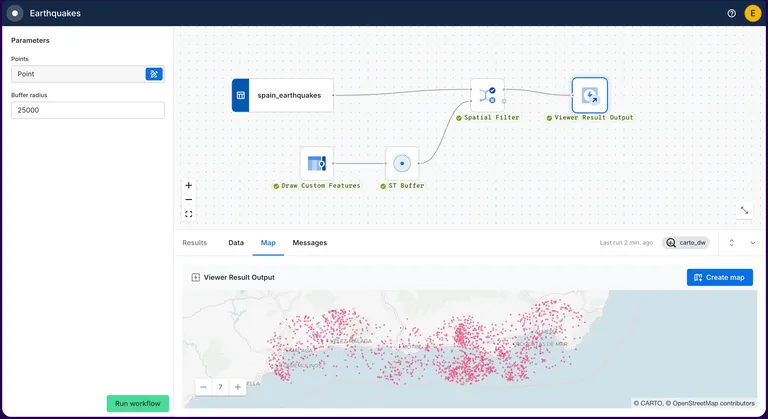
Turn your CARTO Workflows into lightweight, interactive tools for your organization
Helps you to: Transform complex workflows into simple, self-serve tools that business analysts, decision makers, and operations teams can configure and run. No SQL or GIS expertise required.
Until now, sharing a Workflow meant giving someone edit access to the full canvas, which wasn't always ideal. With Viewer Mode, editors can publish a streamlined, interactive version of any Workflow that anyone can configure and run on their own. No complex interfaces, no steep learning curve. Just a clean, simple experience designed around the questions they're already trying to answer.
Think of it as turning a complex analysis into a simple form. They fill in what they need: a location, a threshold, a region drawn on the map, and get results instantly without touching the underlying logic.
Here's what makes it powerful:
- Define what they can configure: Expose only the inputs that matter, like a location, a number threshold, or a geographic area drawn directly on the map.
- Control what they see: Choose exactly which results are displayed, keeping the output clean and focused.
- Keep the canvas protected: Stakeholders run the analysis and explore, the workflow itself stays locked and unchanged.
Your team builds it once. Business analysts run market analysis. Operations managers check coverage gaps. Decision makers explore scenarios on-demand. Less back-and-forth, faster insights, and more time back for the work that matters.
Learn more in our documentation.
The H3 boost: Unlock trade-area analysis at scale
Helps you to: Analyze trade areas faster, across hundreds or thousands of locations at once.
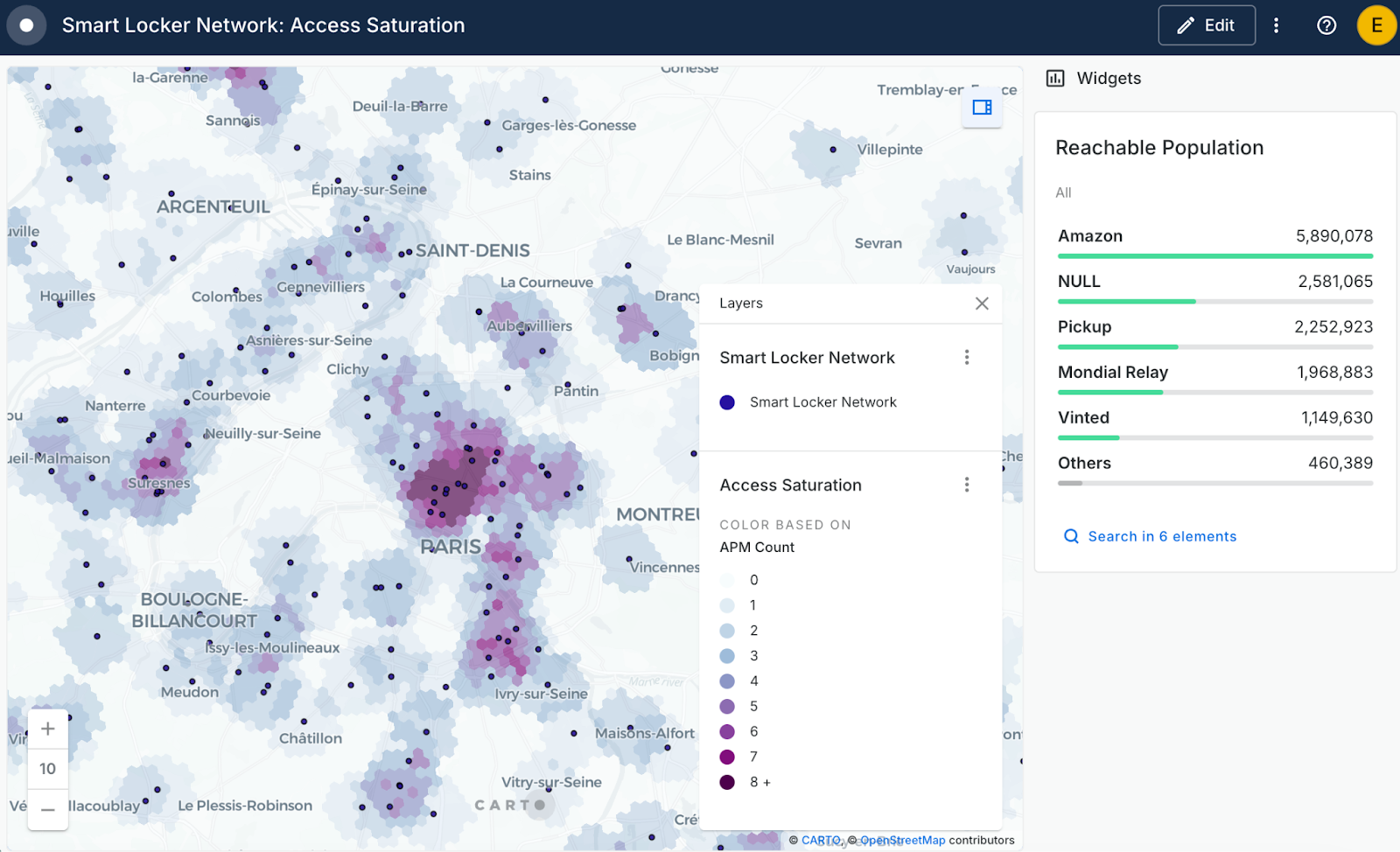
If you've ever needed to run trade-area analysis across many locations, you'll know how quickly traditional drivetime polygons become a bottleneck. With H3-based isochrones powered by TravelTime, you can skip the heavy processing and get straight to the analysis. It's available through the Location Data Services API, the Analytics Toolbox, and as a new Create H3 Isolines component in Workflows.
Because it outputs H3 hexagons, it fits naturally into workflows that already use H3, making it much easier to spot coverage gaps, overlap, and growth opportunities. Teams have reported cutting processing time by up to 99% using H3.
Learn more in our product announcement and documentation.
Enterprise & Governance
Activity Data tracking for public maps
Helps you to: Understand how your public maps are being used.
You've published maps publicly and shared them with the world. But how many people are actually viewing them? Which ones are getting the most attention? Now you can find out. CARTO admins can track views, activity, and exports for public maps directly through Activity Data.
It works through a secure event pipeline built to handle millions of views from unauthenticated users. To get started, export your Activity Data or connect via API.
Learn more in our documentation.

CARTO CLI: Automated CARTO management built for AI Agents
Helps you to: Automate the repetitive parts of managing your CARTO organization, straight from your terminal.
We've launched a CLI for CARTO, and if you've ever wished you could automate the manual parts of managing your organization, this one's for you. You can interact with CARTO directly from your terminal, write scripts, and connect it to AI Agents to handle spatial tasks programmatically.
Right now, you can use it to:
- Find and manage maps, workflows, connections, and developer credentials
- Transfer maps and workflow assets between CARTO organizations and users
- Check organization quotas and usage activity
- Interact with existing AI Agents in your organization
It supports JSON output and headless authentication, making it easy to plug into existing scripts and pipelines. And we're just getting started: longer term, the CLI will be the foundation for AI Agents that can build maps, run workflows, and manage spatial operations with minimal human input.
Read the announcement blog post and get started in our documentation.
Full support for Databricks Spatial SQL functions and data types
Helps you to: Do more with your Databricks data in CARTO, without extra setup or infrastructure to worry about.
We've rebuilt our Databricks integration. The new connection uses SQL Warehouses, so there are no clusters to spin up or manage. It works with Databricks' native spatial data types and SQL functions directly, which means you can bring your geometry data into Builder and Workflows right away, with no extra preparation needed.
The Analytics Toolbox installs directly into the Databricks Unity Catalog, keeping governance simple. You can connect using Personal Access Tokens, M2M, or U2M authentication. Learn more in our documentation.
—
That's Q1 2026! It's been a quarter full of features we're really excited about, and we know they'll make a real difference in how your team works with spatial data.
To keep up with the latest releases, visit the What's New page of our Documentation and follow us on LinkedIn for live updates, or sign up for our newsletter to get highlights straight to your inbox.
Want to sharpen your skills? Explore hands-on tutorials in CARTO Academy. Not a CARTO user yet? Start a 14-day free trial and experience these new features yourself!